TEL:+86 132 6656 7067


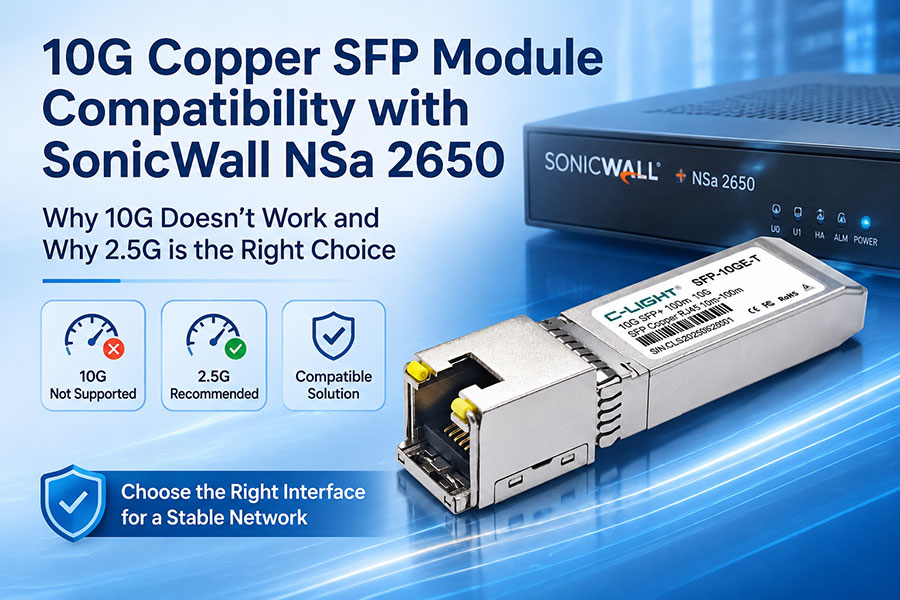
Ethernet connectivity between network security appliances and switches depends on more than the physical connector. A copper SFP module may use an RJ45 interface and fit into an SFP slot, but its supported data rate must also match the host device's port capabilities.
When a 10G copper SFP or SFP+ module is installed in a SonicWall NSa 2650 and the connection fails to establish, the appliance's interface specifications should be checked first. The NSa 2650 does not support 10GbE interfaces. Its available port speeds include 2.5GbE and 1GbE, so selecting a module designed for the supported interface speed is essential.
1. Why a 10G Copper SFP Module May Not Work
A 10GBASE-T copper SFP+ module converts the optical-slot electrical interface into an RJ45 Ethernet connection. It allows compatible equipment to connect to copper Ethernet devices through twisted-pair cabling.
However, physical insertion does not guarantee compatibility. The module's host-side interface, supported Ethernet speeds, power requirements, and device firmware must all be suitable for the host platform.
In the reported case, a 10G copper module did not establish a working connection with a SonicWall NSa 2650. The engineering assessment identified a port-speed mismatch and recommended using a 2.5G copper interface instead.
Key point: A 10G RJ45 module is not automatically compatible with a 2.5GbE SFP port. The host interface must support the module's operating mode and negotiated speed.
2. SonicWall NSa 2650 Port Specifications
According to SonicWall's NSa series datasheet, the NSa 2650 provides several Ethernet interface types with different speed capabilities. It should not be treated as a 10GbE appliance simply because an SFP-form-factor module can physically fit into one of its slots.
| Interface Type | Quantity | Supported Speed | Connection Type |
|---|---|---|---|
| 2.5GbE SFP | 4 | Up to 2.5GbE | SFP module interface |
| 2.5GbE Ethernet | 4 | Up to 2.5GbE | RJ45 copper |
| 1GbE Ethernet | 12 | Up to 1GbE | RJ45 copper |
| Management | 1 | 1GbE | RJ45 management interface |
The important distinction is between the 2.5GbE SFP slots and the native 2.5GbE RJ45 ports. They are different physical interfaces, even though both support a maximum data rate of 2.5Gbps.
3. 10G Copper SFP+ vs. 2.5G Copper SFP
10G copper SFP+ and 2.5G copper SFP modules are designed for different host-interface requirements. A multirate module may support several Ethernet speeds, but the host equipment must also support the relevant speed and module operating mode.
| Comparison | 10G Copper SFP+ | 2.5G Copper SFP |
|---|---|---|
| Primary speed | 10GbE | 2.5GbE |
| Connector | RJ45 | RJ45 |
| Host interface | Requires a compatible SFP+ host port | Requires a compatible 2.5GbE SFP host port |
| Typical application | 10GbE copper links to switches, servers, or network appliances | 2.5GbE copper links to compatible network devices |
| NSa 2650 consideration | 10GbE operation is not supported by the appliance | More closely matches the rated speed of its 2.5GbE SFP interfaces, subject to module validation |
Some 10GBASE-T SFP+ modules support multiple speeds, such as 10G, 5G, 2.5G, and 1G. This does not mean that every multirate module will work in every 2.5GbE SFP slot. Compatibility must be confirmed for the exact module and appliance combination.
4. Recommended Connection Options for SonicWall NSa 2650
When connecting a copper Ethernet device to the NSa 2650, the appropriate solution depends on which physical port is available and what speed the connected equipment supports.
Option 1: Use the Native 2.5GbE RJ45 Port
If the connected device has a standard RJ45 Ethernet interface and supports 2.5GbE, a native 2.5GbE copper port on the NSa 2650 may be the simplest connection method. This avoids the need for an SFP copper module.
Option 2: Use a Compatible 2.5GbE Copper SFP Module
If the connection must use one of the appliance's 2.5GbE SFP slots, select a copper SFP module whose host interface and speed capabilities are explicitly suitable for the NSa 2650. Confirm the supported module list and firmware requirements before deployment.
Option 3: Check the Connected Device's Negotiated Speed
The connected switch, server, or network device must also support the selected Ethernet speed. If the two endpoints have different speed capabilities or incompatible negotiation settings, the physical link may fail to establish or may operate unreliably.
Selection principle: Match the module to the appliance's actual SFP interface, then confirm that the remote Ethernet port supports the same speed and negotiation mode.
5. What to Check When the Ethernet Link Does Not Come Up
Before replacing the module or changing the network design, verify the following items:
Appliance model: Confirm that the device is specifically a SonicWall NSa 2650.
Physical port: Identify whether the module is installed in a 2.5GbE SFP slot or whether the connection uses a native RJ45 port.
Module specification: Check whether the copper SFP supports 2.5GbE on its host interface.
Remote port speed: Confirm the supported speed of the connected switch, server, or other Ethernet device.
Auto-negotiation: Verify that both ends use compatible speed and duplex settings.
Firmware and compatibility: Check the appliance firmware and the manufacturer's supported transceiver information.
Cabling: Verify the RJ45 cable category, termination, and physical condition against the required Ethernet speed and distance.
Testing with a known-compatible module and a short, verified Ethernet cable can also help separate a module compatibility issue from a cabling or remote-device problem.
6. Why Port Speed Compatibility Matters
Ethernet transceivers are designed around defined host electrical interfaces and network data rates. A module that supports 10GbE at its RJ45 side cannot be assumed to operate at 2.5GbE simply because it fits into an SFP slot.
For multirate copper modules, both the module and host must support the selected operating speed. The module's datasheet should identify supported host rates, copper-side speeds, cable requirements, and power consumption. The appliance documentation should confirm the supported SFP interface modes.
This is particularly important for firewall appliances, where an unsupported module or mismatched link configuration can prevent the interface from establishing a stable connection.
7. Conclusion
The SonicWall NSa 2650 does not support 10GbE interfaces. Its network interfaces include 2.5GbE SFP ports, 2.5GbE RJ45 ports, and 1GbE RJ45 ports. Therefore, a 10G copper SFP+ module should not be assumed to work with this appliance.
For the reported connectivity issue, the engineering recommendation to use a 2.5G copper solution is consistent with the NSa 2650's interface speed specifications. The final selection should distinguish between a native 2.5GbE RJ45 port and a 2.5GbE copper SFP module, and should be validated against the exact port, module, firmware, and connected device.
Choosing the correct Ethernet transceiver requires matching both the physical interface and the supported data rate. For module selection and application compatibility, Contact C-LIGHT for technical assistance.
 >

 >
 >
 >
 >
 >
 >
 >