TEL:+86 132 6656 7067


In 10-gigabit network deployments, the 10G copper SFP+ module has become a mainstream choice for short-distance transmission due to its cost-effectiveness, low power consumption, and plug-and-play convenience. However, with numerous models and varying parameters on the market, selecting a stable, reliable module that perfectly matches one’s network environment poses a challenge for many network engineers and IT purchasers. This article systematically analyzes the core factors in choosing a 10G Copper SFP+ module.
I. Understanding the Basics: What is a 10G Copper SFP+ Module?
A 10G copper SFP+ module (typically referring to 10GBase-T SFP+) is an electrical interface module that uses a standard RJ45 connector and twisted-pair cables (usually Cat6a/Cat7) for 10Gbps data transmission, supporting distances up to 30 meters (Cat6a may reach 55 meters under ideal conditions, but the standard recommendation is 30 meters). Its primary distinction from optical modules lies in the transmission medium and distance, making it suitable for short-distance connections such as server-to-switch links within a rack or inter-switch stacking.
Key Advantages:
- Cost-Effective: Lower deployment cost compared to optical modules and fiber patch cables.
- Backward Compatibility: Typically supports auto-negotiation down to 1Gbps, compatible with existing network equipment.
- Easy Installation & Maintenance: Familiar interface, simple cabling, no fiber splicing or cleaning required.
II. Six Key Dimensions for Selecting a 10G Copper SFP+ Module
2.1 Switch/Device Compatibility: The Top Priority
This is the most critical step. Incompatible modules may cause unrecognized ports, errors, or unstable performance.
- Brand Compatibility Strategy: Most vendors use compatibility codes/locking. Prioritize checking the official compatibility list of your device.
- Coding & Standardization: Opt for modules compliant with the standard MSA for better universality. For strictly locked devices, consider purchasing OEM modules or certified third-party compatible modules.
- Practical Advice: Before purchasing, provide the supplier with your device brand, model, and IOS/NOS version, and request compatibility test reports or guarantees.
2.2 Transmission Distance & Cable Type: Matching the Physical Environment
Clearly define distance requirements and select cables accordingly.
- Standard Distance: Use Cat6a (recommended) or Cat7 shielded twisted-pair cables for up to 30 meters of 10Gbps transmission. While Cat5e might work for very short distances (under ~37 meters), it is non-standard, prone to interference, and not recommended for new deployments.
- Cable Quality: Ensure pure copper cables (not copper-clad aluminum) and properly constructed RJ45 connectors are used, as this is fundamental for signal integrity.
2.3 Power Consumption & Heat Dissipation: Impacting Stability & Density
10GBase-T technology relies on complex DSP processing, resulting in significantly higher power consumption (typically 2.5W-4W) compared to optical modules (~1W).
- Check Device Power Budget: Ensure the switch port can supply sufficient power to the module.
- Focus on Thermal Design: In high-density deployments, module heat can affect adjacent ports and overall device cooling. Choose modules with good thermal design and ensure proper cabinet ventilation.
2.4 Latency & Performance: Meeting Application Needs
While copper modules have slightly higher latency than direct-attach optical modules (typically an additional ~0.5 to 2 microseconds), this difference is negligible for most enterprise applications (e.g., virtualization, storage). For ultra-low-latency trading systems or high-performance computing clusters, evaluate specific latency parameters.
2.5 Management & Diagnostic Features: Enabling Smart Operations
A quality module should support basic DDMI (Digital Diagnostic Monitoring) functions, allowing reading via SNMP or CLI:
- Real-time temperature
- Supply voltage
- Transceiver power (with relevant alarms)
This provides valuable data for network monitoring and pre-failure detection.
2.6 Supplier & Warranty: Reliable Supply Chain & Service
- Choose a Professional Supplier: Seek suppliers with a good reputation in the data center field who can provide professional technical support and compatibility assurance.
- Clarify Warranty Policy: Standard warranties are typically 3-5 years.
- Verification & Testing: Request samples for in-device testing to verify compatibility and stability, especially before bulk purchases.
III. Application Scenarios & Configuration Recommendations
- Data Center Server Access: Ideal for ToR (Top-of-Rack) connections to servers within the same rack, short distances, no optical-electrical conversion needed.
- Enterprise Core & Aggregation Layer Interconnections: Suitable for connecting equipment within the same wiring closet or adjacent server rooms.
- Network Device Stacking: Some switches support stacking connections via 10G copper cables.
- Storage Network Connections: Connecting to NAS or iSCSI storage, meeting high-bandwidth demands.
Sample Configuration List:
To connect a server located 25 meters from the switch, you may need:
- Two 10GBase-T SFP+ modules compatible with your switch.
- One 30-meter shielded twisted-pair cable of Cat6a or higher grade.
- Optional cable management tools.
IV. Common Misconceptions & Pitfalls to Avoid
- Misconception 1: Blindly pursuing the lowest price. Low-quality modules can cause network instability, packet loss, or even damage switch ports, leading to higher total cost of ownership.
- Misconception 2: Neglecting cable quality. Module performance heavily depends on high-quality cables. Do not cut corners here.
- Misconception 3: Overlooking power consumption and heat dissipation. In high-density deployments, this can cause device overheating and reboots.
- Misconception 4: Deploying in bulk without testing. Always conduct small-scale in-device testing to verify compatibility and stability.
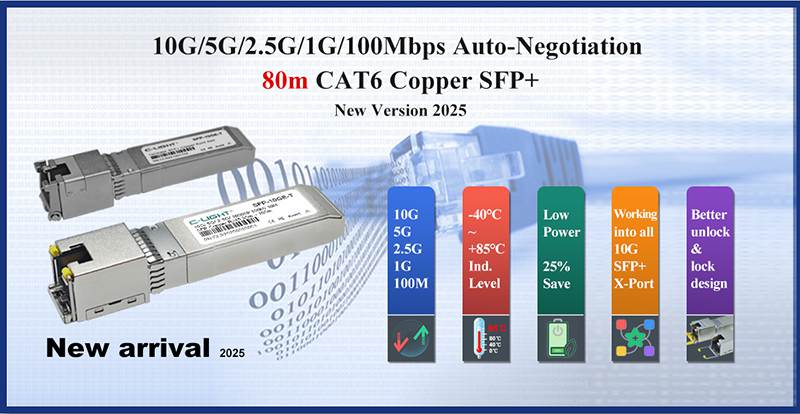
| Form Factor | Part No. | Data Rate | Distance | Connector | Case Temperature |
| SFP+ | CLSFP10GTX1 | 10G/5G/2.5G/1000M | 30m | RJ45 | Com./Ind. |
| SFP+ | CLSFP10GTX2 | 10G/5G/2.5G/1000M | 100m @5G | RJ45 | Com./Ind. |
| SFP+ | CLSFP10GTX3 | 10G/5G/2.5G/1000M/100M | 80m@10G | RJ45 | Com./Ind. |
| SFP | CLSFP2GTX1 | 2.5G/1000M/100M | 100m | RJ45 | Com./Ind. |
| SFP | CLSFPGETX2 | 10M/100M/1000M | 100m | RJ45 | Com./Ind. |
| SFP | CLSFPGETX3 | 1000M | 100m | RJ45 | Com./Ind. |
| SFP | CLSFPGETX4 | 1000M/100M | 100m | RJ45 | Com./Ind. |
| SFP | CLSFPFETX | 100M | 100m | RJ45 | Com./Ind. |
Selecting the right 10G copper SFP+ module is a systematic task requiring comprehensive consideration of compatibility, physical environment, performance needs, and supplier services. The key is to: prioritize device compatibility, strictly match transmission distance and cable standards, pay attention to the impact of power consumption and heat dissipation on stability, and source products with comprehensive diagnostic features and warranties from reliable suppliers.
How to Choose a 10G Copper SFP+ Module FAQ
Q1: What is a 10G Copper SFP+ module?
Answer: A 10G Copper SFP+ module is a high-speed Ethernet transceiver that converts an SFP+ optical port into an RJ45 electrical interface for 10Gbps data transmission over copper cables.
Unlike optical transceivers that use fiber, 10G Copper SFP+ modules use twisted-pair copper cables such as Cat6a or Cat7, making them suitable for short-distance network connections, server access, and switch-to-switch links.
Q2: What factors should I consider when selecting a 10G Copper SFP+ module?
Answer: When choosing a 10G Copper SFP+ module, the main factors include:
Network equipment compatibility
Transmission distance requirements
Copper cable category
Power consumption
Heat dissipation capability
Diagnostic monitoring features
Supplier reliability
Selecting the correct module ensures stable 10Gb Ethernet performance and avoids compatibility or overheating issues during deployment.
Q3: How do I check compatibility between a 10G Copper SFP+ module and my switch?
Answer: Compatibility is one of the most important considerations when selecting a 10G Copper SFP+ module.
Before deployment, verify:
Switch or router model compatibility
Supported Ethernet standards
Module coding requirements
Firmware or operating system compatibility
Using compatible or properly coded modules helps ensure the switch can recognize the transceiver and maintain stable network operation.
Q4: What cable type is required for a 10G Copper SFP+ module?
Answer: A 10G Copper SFP+ module typically requires high-quality twisted-pair copper cables.
Recommended cable types include:
Cat6a cable for standard 10Gb Ethernet deployment
Cat7 cable for higher performance and improved signal quality
Cable quality directly affects transmission stability, electromagnetic interference resistance, and achievable distance.
Q5: How far can a 10G Copper SFP+ module transmit?
Answer: The transmission distance depends on the module type and cable quality.
For 10GBASE-T SFP+ RJ45 modules:
Cat6a/Cat7 copper cables are commonly used for short-distance 10Gb Ethernet connections.
Typical applications are within racks, between adjacent cabinets, and in enterprise network rooms.
For distances beyond the practical range of copper transmission, fiber optical modules are usually recommended.
Q6: Why is power consumption important for 10G Copper SFP+ modules?
Answer: Power consumption is an important factor because 10GBASE-T copper modules require signal processing chips to convert electrical signals at high speeds.
Higher power consumption can increase heat generation, especially in high-density switches. Selecting low-power modules with efficient thermal design helps improve network reliability and equipment stability.
Q7: What is the difference between a 10G Copper SFP+ module and a 10G optical transceiver?
Answer: The main difference is the transmission medium.
| Feature | 10G Copper SFP+ | 10G Optical Module |
| Medium | Copper cable | Fiber cable |
| Connector | RJ45 | LC/MPO |
| Cost | Lower for short links | Higher but scalable |
| Distance | Short distance | Short to long distance |
| Application | Server access, rack connections | Backbone, campus, DCI |
10G Copper SFP+ is ideal when existing copper infrastructure is available and cost efficiency is important. Fiber solutions are better for longer distances and future scalability.
Q8: What are the typical applications of 10G Copper SFP+ modules?
Answer: 10G Copper SFP+ modules are widely used in:
Data center server-to-switch connections
Top-of-Rack (ToR) deployments
Enterprise LAN upgrades
Storage network connections
Short-distance switch interconnections
They provide a cost-effective solution for organizations that need 10Gb Ethernet performance without replacing existing copper cabling infrastructure.
 >
>

 >
>
 >
>
 >
>
 >
>
 >
>
 >
>
 >
>